
Free WMA to MP3 Changer
Version: 2.0
Updated on: 17 Jan 2014
Price: Free
Free WMA to MP3 Changer is freeware which converts files from WMA format to MP3.
Using this program you can process conversion easily and without problems.
It also supports video files in WMV and ASF formats, and allows you to save audio tracks in MP3 format.
Main Features:
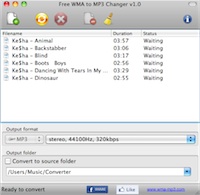
Clean interface
Interface is clear and easily understood. All necessary settings are easily accessed and changed.Batch conversion
Supports conversion of many files in batch mode. Simply add multiple files for conversion and start it.Fast and efficient
Conversion speed is fast because the program uses all the power of your computer.iTunes support
Enables you to automatically import converted MP3 file to iTunes.High quality
Uses the latest MP3 codec. Thus the quality of your converted file is high.Supports Drag&Drop
It is easy to add files using Drag&Drop operation.Free to use
You may use it absolutely free for commercial and non-commercial purposes.
As you can see, this program is good if you need to convert your WMA files. Download it and evaluate for yourself.